
12 KiB
| title | chunk | source | category | tags | date_saved | instance |
|---|---|---|---|---|---|---|
| Cross Axis - Glossary | MDN | 1/3 | https://developer.mozilla.org/en-US/docs/Glossary/Cross_Axis | reference | web, html, css, javascript, documentation | 2026-05-05T05:28:47.387323+00:00 | kb-cron |
MDN HTML HTML: Markup language
HTML reference
HTML guides
Markup languages
CSS reference
CSS guides
Layout cookbook
JavaScriptJS JavaScript: Scripting language
JS reference
JS guides
Web APIs Web APIs: Programming interfaces
Web API reference
Web API guides
- Using the Web animation API
- Using the Fetch API
- Working with the History API
- Using the Web speech API
- Using web workers
Technologies
Topics
Learn Learn web development
Frontend developer course
- Getting started modules
- Core modules
- MDN Curriculum
- Check out the video course from Scrimba, our partner
Learn HTML
Learn CSS
Learn JavaScript
Tools Discover our tools
About Get to know MDN better
Cross Axis
The cross axis in flexbox runs perpendicular to the main axis, therefore if your flex-direction is either row or row-reverse then the cross axis runs down the columns.
 If your main axis is
 column or column-reverse then the cross axis runs along the rows.
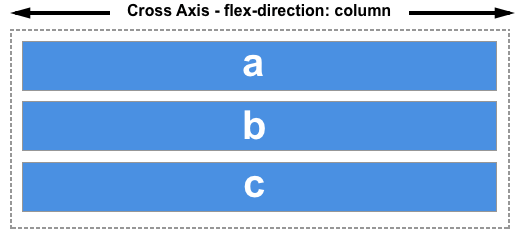 Alignment of items on the cross axis is achieved with the
 align-items property on the flex container or align-self property on individual items. In the case of a multi-line flex container, with additional space on the cross axis, you can use align-content to control the spacing of the rows.
In this article
See also
Property reference
align-contentalign-itemsalign-selfflex-wrapflex-directionflexflex-basisflex-flowflex-growflex-shrinkjustify-contentorder
Further reading
CSS flexbox guides: