
12 KiB
| title | chunk | source | category | tags | date_saved | instance |
|---|---|---|---|---|---|---|
| HTML - Glossary | MDN | 1/3 | https://developer.mozilla.org/en-US/docs/Glossary/HTML | reference | web, html, css, javascript, documentation | 2026-05-05T05:33:26.460220+00:00 | kb-cron |
MDN HTML HTML: Markup language
HTML reference
HTML guides
Markup languages
CSS reference
CSS guides
Layout cookbook
JavaScriptJS JavaScript: Scripting language
JS reference
JS guides
Web APIs Web APIs: Programming interfaces
Web API reference
Web API guides
- Using the Web animation API
- Using the Fetch API
- Working with the History API
- Using the Web speech API
- Using web workers
Technologies
Topics
Learn Learn web development
Frontend developer course
- Getting started modules
- Core modules
- MDN Curriculum
- Check out the video course from Scrimba, our partner
Learn HTML
Learn CSS
Learn JavaScript
Tools Discover our tools
About Get to know MDN better
HTML
HTML (HyperText Markup Language) is a descriptive language that specifies webpage structure.
In this article
Brief history
In 1990, as part of his vision of the Web, Tim Berners-Lee defined the concept of hypertext, which Berners-Lee formalized the following year through a markup mainly based on SGML. The IETF began formally specifying HTML in 1993, and after several drafts released version 2.0 in 1995. In 1994 Berners-Lee founded the W3C to develop the Web. In 1996, the W3C took over the HTML work and published the HTML 3.2 recommendation a year later. HTML 4.0 was released in 1999 and became an ISO standard in 2000. At that time, the W3C nearly abandoned HTML in favor of XHTML, prompting the founding of an independent group called WHATWG in 2004. Thanks to WHATWG, work on HTML continued: the two organizations released the first draft of HTML5 in 2008 and an official standard in 2014. The term "HTML5" is just a buzzword referring to modern web technologies which are part of the HTML Living Standard.
Concept and syntax
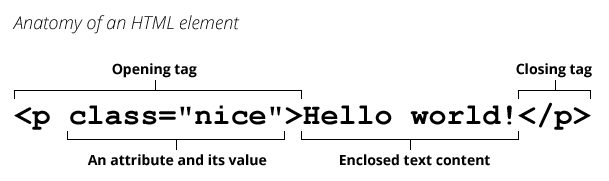
An HTML document is a plaintext document structured with elements. Elements are surrounded by matching opening and closing tags. Each tag begins and ends with angle brackets (<>). There are a few empty or void elements that cannot enclose any text, for instance <img>.
You can extend HTML tags with attributes, which provide additional information affecting how the browser interprets the element:
 An HTML file is normally saved with an
 .htm or .html extension, served by a web server, and can be rendered by any Web browser.