
11 KiB
| title | chunk | source | category | tags | date_saved | instance |
|---|---|---|---|---|---|---|
| Inline-level content - Glossary | MDN | 1/3 | https://developer.mozilla.org/en-US/docs/Glossary/Inline-level_content | reference | web, html, css, javascript, documentation | 2026-05-05T05:35:16.223541+00:00 | kb-cron |
MDN HTML HTML: Markup language
HTML reference
HTML guides
Markup languages
CSS reference
CSS guides
Layout cookbook
JavaScriptJS JavaScript: Scripting language
JS reference
JS guides
Web APIs Web APIs: Programming interfaces
Web API reference
Web API guides
- Using the Web animation API
- Using the Fetch API
- Working with the History API
- Using the Web speech API
- Using web workers
Technologies
Topics
Learn Learn web development
Frontend developer course
- Getting started modules
- Core modules
- MDN Curriculum
- Check out the video course from Scrimba, our partner
Learn HTML
Learn CSS
Learn JavaScript
Tools Discover our tools
About Get to know MDN better
Inline-level content
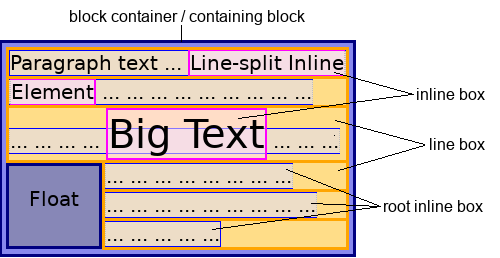
In CSS, content that participates in inline layout is called inline-level content. Most text sequences, replaced elements, and generated content are inline-level by default.
In inline layout, a mixed stream of text, replaced elements, and other inline boxes are laid out by fragmenting them into a stack of line boxes. Within each line box, inline-level boxes are aligned to each other vertically or horizontally, depending on the writing mode. Typically, they are aligned by the baselines of their text. This can be changed with CSS.
 Note: HTML (HyperText Markup Language) elements historically were categorized as either "block-level" elements or "inline" elements. As a presentational characteristic, this is now specified by CSS.
In this article
Examples
In this example, the <p> element contains some text. Within that text is a <span> element and two <input> elements, which are inline-level elements. If the <span> is spread across two lines, two line boxes are generated. Because these elements are inline, the paragraph correctly renders as a single paragraph of unbroken text flow:
See also
- Related glossary terms:
- Inline formatting context
display