
13 KiB
| title | chunk | source | category | tags | date_saved | instance |
|---|---|---|---|---|---|---|
| Tiles and tilemaps overview - Game development | MDN | 1/3 | https://developer.mozilla.org/en-US/docs/Games/Techniques/Tilemaps | reference | web, html, css, javascript, documentation | 2026-05-05T05:21:59.650321+00:00 | kb-cron |
MDN HTML HTML: Markup language
HTML reference
HTML guides
Markup languages
CSS reference
CSS guides
Layout cookbook
JavaScriptJS JavaScript: Scripting language
JS reference
JS guides
Web APIs Web APIs: Programming interfaces
Web API reference
Web API guides
- Using the Web animation API
- Using the Fetch API
- Working with the History API
- Using the Web speech API
- Using web workers
Technologies
Topics
Learn Learn web development
Frontend developer course
- Getting started modules
- Core modules
- MDN Curriculum
- Check out the video course from Scrimba, our partner
Learn HTML
Learn CSS
Learn JavaScript
Tools Discover our tools
About Get to know MDN better
Tiles and tilemaps overview
Tilemaps are a very popular technique in 2D game development, consisting of building the game world or level map out of small, regular-shaped images called tiles. This results in performance and memory usage gains — big image files containing entire level maps are not needed, as they are constructed by small images or image fragments multiple times. This set of articles covers the basics of creating tile maps using JavaScript and Canvas (although the same high level techniques could be used in any programming language.) Besides the performance gains, tilemaps can also be mapped to a logical grid, which can be used in other ways inside the game logic (for example creating a path-finding graph, or handling collisions) or to create a level editor. Some popular games that use this technique are Super Mario Bros , Pacman , Zelda: Link's Awakening , Starcraft , and Sim City 2000. Think about any game that uses regularly repeating squares of background, and you'll probably find it uses tilemaps.
In this article
The tile atlas
The most efficient way to store the tile images is in an atlas or spritesheet. This is all of the required tiles grouped together in a single image file. When it's time to draw a tile, only a small section of this bigger image is rendered on the game canvas. The below images shows a tile atlas of 8 x 4 tiles:
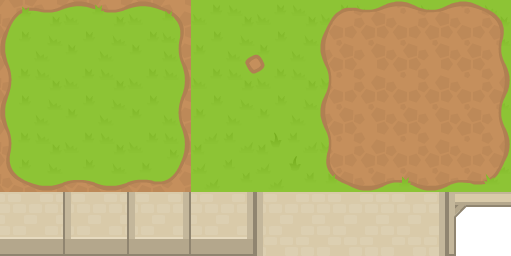 Using an atlas also has the advantage of naturally assigning every tile an index. This index is perfect to use as the tile identifier when creating the tilemap object.
The tilemap data structure
It is common to group all the information needed to handle tilemaps into the same data structure or object. These data objects (map object example) should include:
- Tile size : The size of each tile in pixels across / pixels down.
- Image atlas : The Image atlas that will be used (one or many.)
- Map dimensions : The dimensions of the map, either in tiles across / tiles down, or pixels across / pixels down.
- Visual grid : Includes indices showing what type of tile should be placed on each position in the grid.
- Logic grid : This can be a collision grid, a path-finding grid, etc., depending on the type of game.
Note: For the visual grid, a special value (usually a negative number, 0 or null) is needed to represent empty tiles.
Square tiles
Square-based tilemaps are the most simple implementation. A more generic case would be rectangular-based tilemaps — instead of square — but they are far less common. Square tiles allow for two perspectives :
- Top-down (like many RPG's or strategy games like Warcraft 2 or Final Fantasy 's world view.)
- Side-view (like platformers such as Super Mario Bros.)