11 KiB
| title | chunk | source | category | tags | date_saved | instance |
|---|---|---|---|---|---|---|
| Grid Axis - Glossary | MDN | 1/3 | https://developer.mozilla.org/en-US/docs/Glossary/Grid_Axis | reference | web, html, css, javascript, documentation | 2026-05-05T05:32:56.952494+00:00 | kb-cron |
MDN HTML HTML: Markup language
HTML reference
HTML guides
Markup languages
CSS reference
CSS guides
Layout cookbook
JavaScriptJS JavaScript: Scripting language
JS reference
JS guides
Web APIs Web APIs: Programming interfaces
Web API reference
Web API guides
- Using the Web animation API
- Using the Fetch API
- Working with the History API
- Using the Web speech API
- Using web workers
Technologies
Topics
Learn Learn web development
Frontend developer course
- Getting started modules
- Core modules
- MDN Curriculum
- Check out the video course from Scrimba, our partner
Learn HTML
Learn CSS
Learn JavaScript
Tools Discover our tools
About Get to know MDN better
Grid Axis
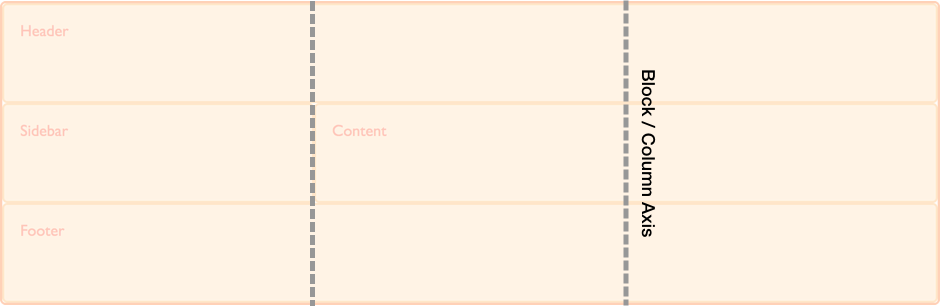
CSS grid layout is a two-dimensional layout method enabling the laying out of content in rows and columns. Therefore in any grid we have two axes. The block or column axis , and the inline or row axis.
It is along these axes that items can be aligned and justified using the properties defined in the Box Alignment specification.
The inline axis (also called row axis, or main axis) is the direction along which regular text flows. The block axis (also called column axis, or cross axis) is the axis used when laying out blocks of text. The physical direction of these axes can change according to the writing mode of the document.
For example, if you are writing left to right, top to bottom (like typical English prose), then the individual characters are placed along the inline axis, which runs from left to right.
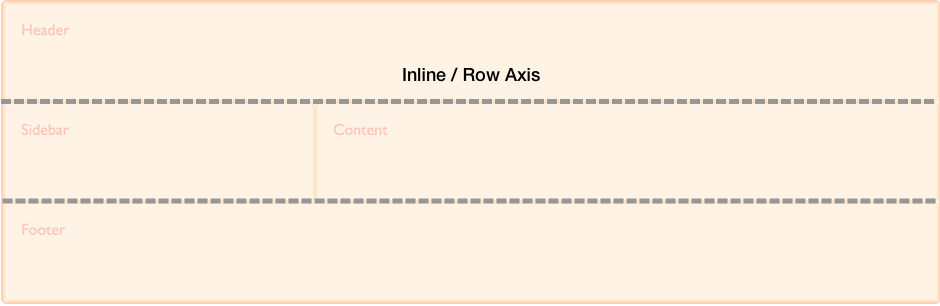 And, if the text contains multiple lines, these lines are placed along the block axis, which runs from top to bottom.