
11 KiB
| title | chunk | source | category | tags | date_saved | instance |
|---|---|---|---|---|---|---|
| Top layer - Glossary | MDN | 1/3 | https://developer.mozilla.org/en-US/docs/Glossary/Top_layer | reference | web, html, css, javascript, documentation | 2026-05-05T05:47:22.371748+00:00 | kb-cron |
MDN HTML HTML: Markup language
HTML reference
HTML guides
Markup languages
CSS reference
CSS guides
Layout cookbook
JavaScriptJS JavaScript: Scripting language
JS reference
JS guides
Web APIs Web APIs: Programming interfaces
Web API reference
Web API guides
- Using the Web animation API
- Using the Fetch API
- Working with the History API
- Using the Web speech API
- Using web workers
Technologies
Topics
Learn Learn web development
Frontend developer course
- Getting started modules
- Core modules
- MDN Curriculum
- Check out the video course from Scrimba, our partner
Learn HTML
Learn CSS
Learn JavaScript
Tools Discover our tools
About Get to know MDN better
Top layer
The top layer is a specific layer that spans the entire width and height of the viewport and sits on top of all other layers displayed in a web document. It is created by the browser to contain elements that should appear on top of all other content on the page.
Elements placed in the top layer generate a new stacking context, as do their corresponding ::backdrop pseudo-elements.
Elements that will appear in the top layer include:
- Fullscreen elements, i.e., elements that have been caused to display in fullscreen mode by a successful
Element.requestFullscreen()call. <dialog>elements displayed as a modal via a successfulHTMLDialogElement.showModal()call.- Popover elements shown via a successful
HTMLElement.showPopover()call.
Some browsers, such as Chrome, show elements placed in the top layer inside a special DOM tree entry. For example:
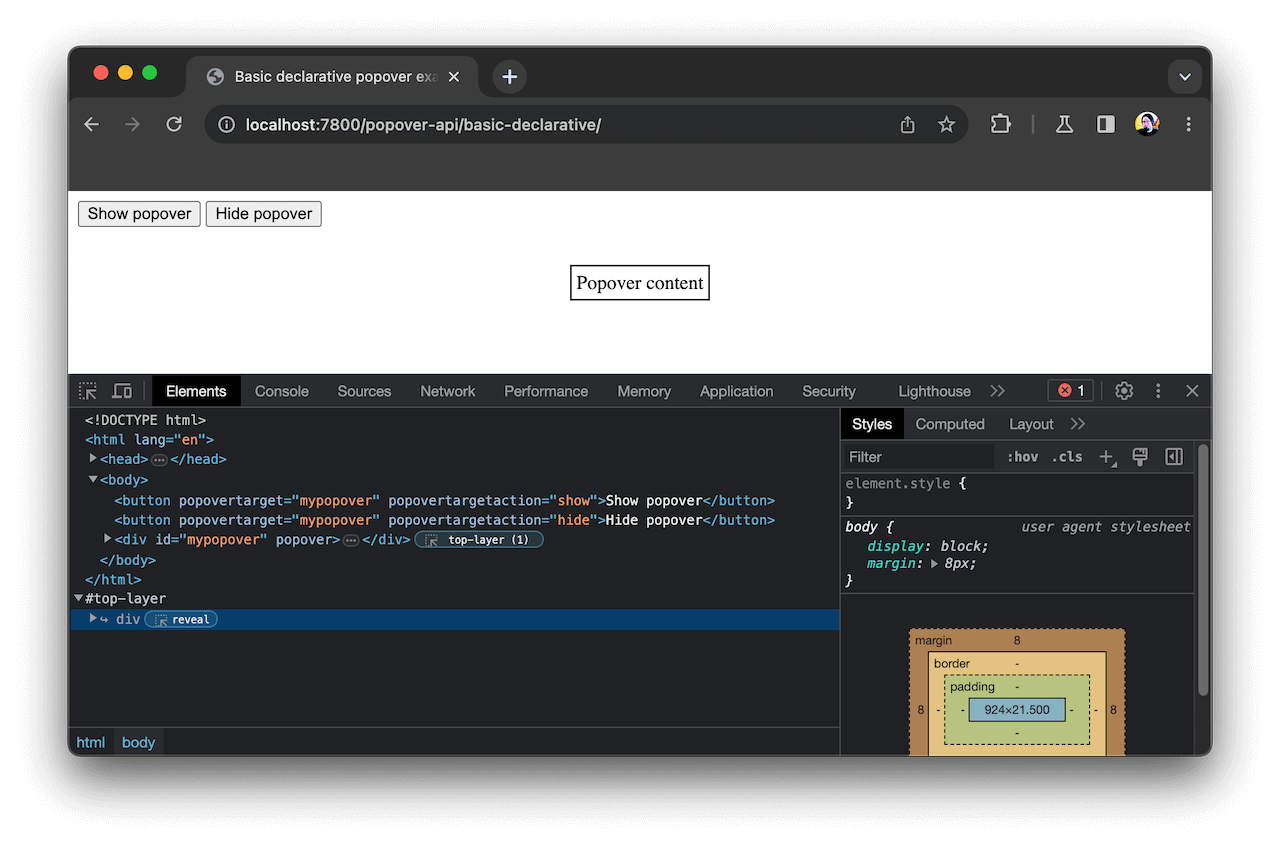 Note that the top layer is an internal browser concept and cannot be directly manipulated from code. You can target elements placed in the top layer using CSS and JavaScript, but you cannot target the top layer itself.
In this article
See also
- The stacking context
- Fullscreen API
<dialog>element,HTMLDialogElementinterface- Popover API
:fullscreenpseudo-class