
13 KiB
| title | chunk | source | category | tags | date_saved | instance |
|---|---|---|---|---|---|---|
| Grid lines - Glossary | MDN | 1/3 | https://developer.mozilla.org/en-US/docs/Glossary/Grid_Lines | reference | web, html, css, javascript, documentation | 2026-05-05T05:33:07.983932+00:00 | kb-cron |
MDN HTML HTML: Markup language
HTML reference
HTML guides
Markup languages
CSS reference
CSS guides
Layout cookbook
JavaScriptJS JavaScript: Scripting language
JS reference
JS guides
Web APIs Web APIs: Programming interfaces
Web API reference
Web API guides
- Using the Web animation API
- Using the Fetch API
- Working with the History API
- Using the Web speech API
- Using web workers
Technologies
Topics
Learn Learn web development
Frontend developer course
- Getting started modules
- Core modules
- MDN Curriculum
- Check out the video course from Scrimba, our partner
Learn HTML
Learn CSS
Learn JavaScript
Tools Discover our tools
About Get to know MDN better
Grid lines
Grid lines are created anytime you use a CSS grid layout.
In this article
Example
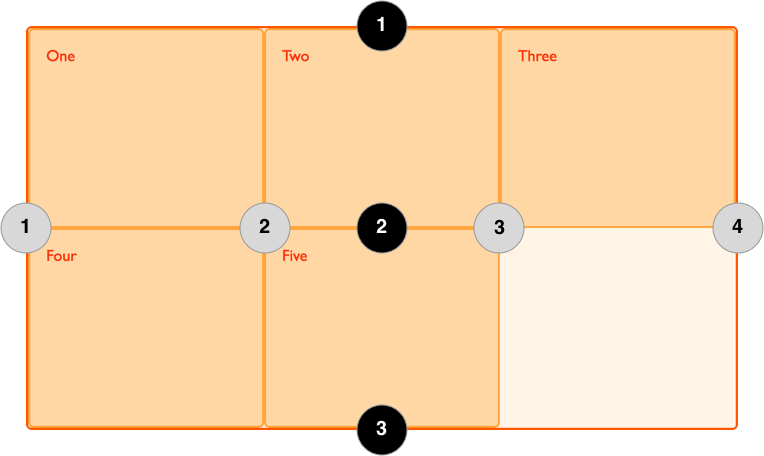
In the following example there is a grid with three column tracks and two row tracks. This gives us 4 column lines and 3 row lines.
Lines can be addressed using their line number. In a left-to-right language such as English, column line 1 will be on the left of the grid, row line 1 on the top. Lines numbers respect the writing mode of the document and so in a right-to-left language for example, column line 1 will be on the right of the grid. The image below shows the line numbers of the grid, assuming the language is left-to-right.
 Lines are also created in the implicit grid when implicit tracks are created to hold content positioned outside of the explicit grid , however these lines cannot be addressed by a number.
Placing items onto the grid by line number
Having created a grid, you can place items onto the grid by line number. In the following example the item is positioned from column line 1 to column line 3, and from row line 1 to row line 3.
Naming lines
The lines created in the explicit grid can be named, by adding the name in square brackets before or after the track sizing information. When placing an item, you can then use these names instead of the line number, as demonstrated below.
See also
Property reference
grid-template-columnsgrid-template-rowsgrid-column-startgrid-column-endgrid-columngrid-row-startgrid-row-endgrid-row